An international address generator helps localization teams test the address shapes users actually enter across countries. A global product should not rely on one US-style sample and hope it works everywhere.
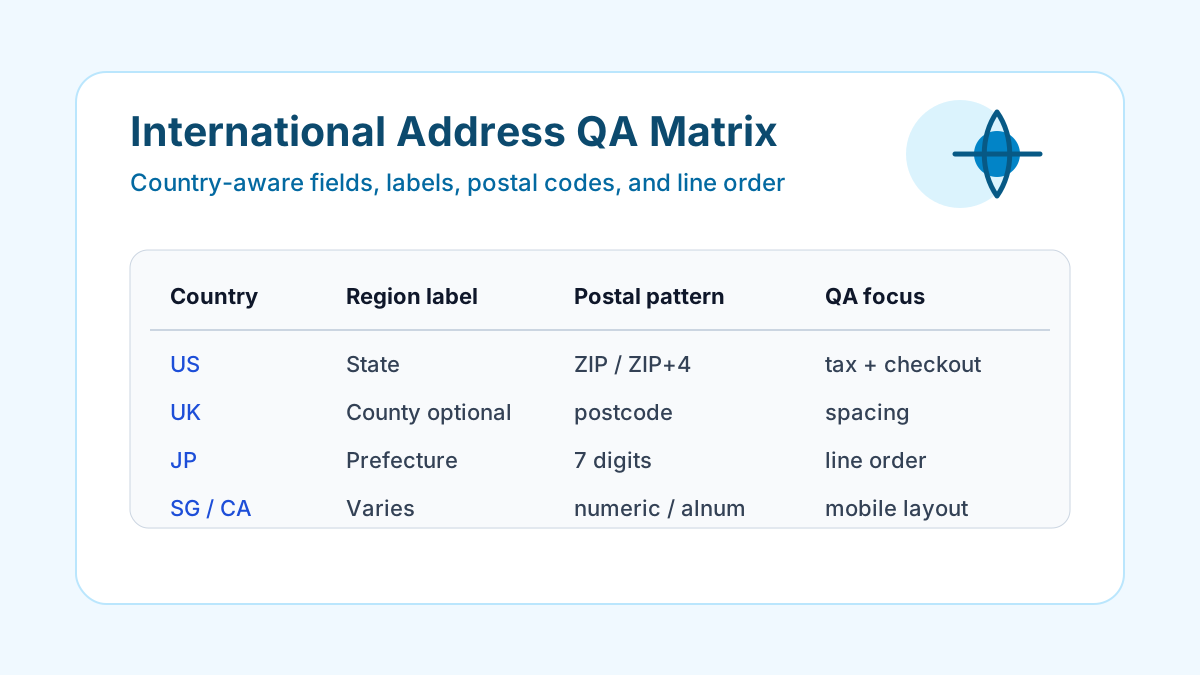
The Universal Postal Union describes S42 as an international addressing standard with worldwide address components and country-specific templates on its Addressing Solutions page. That is the core lesson for software QA: country-specific formatting is a feature, not an edge case.
First localization matrix
Use the country address generator directory to create a small matrix before a release.
| Country | QA focus | Why it matters |
|---|---|---|
| United States | State, ZIP, ZIP+4, tax flows | Common default market assumptions |
| United Kingdom | Alphanumeric postcode spacing | Regex and uppercase handling |
| Canada | Province and postal code casing | Similar to US, but not identical |
| Japan | Prefecture and line order | Localized labels and formatting |
| Australia | State or territory abbreviation | Region dropdown behavior |
| Singapore | Compact format, six-digit code | Optional region fields |
| New Zealand | City and postcode assumptions | Optional area handling |
This set gives QA enough variation to catch the most common global address bugs without running a massive country list on every pull request.
What to inspect
International address testing should cover both input and output.
- Form labels change by country: state, province, prefecture, region, suburb, or no region field.
- Postal code validation uses country-aware patterns.
- Long city and street values wrap in mobile layouts.
- Address summaries keep the correct line order.
- Saved address cards do not hide required context.
- Admin tools show country code and localized display name separately.
- Saved JSON preserves structured fields and formatted summaries.
If your team needs a repeatable case, copy generated JSON from the browser and save the exact payload beside the bug report or regression test.
Search-intent examples
These are the questions users usually search when they hit localization defects:
| Search phrase | Page or workflow to link |
|---|---|
| international address generator for testing | /addresses |
| random address by country | country generator pages |
| test UK postcode form | /uk-address |
| Japan address format for forms | /jp-address |
| sample Canada address for QA | /ca-address |
Build content and internal links around those phrases naturally. The page should answer the user's testing question first, then route them to the generator that solves it.
Related guides
- Global Address Format Guide for QA Teams
- Localization QA with Synthetic Address Data
- Address Form Testing Checklist
- Random US Address Generator for Testing
FAQ
Why use an international address generator for localization QA?
It exposes country-specific field labels, postal code formats, line order, and layout edge cases that one domestic address sample cannot cover.
Which countries should a first localization smoke test include?
Start with the United States, United Kingdom, Canada, Japan, Australia, Singapore, and New Zealand because they force different postal code and region-field behavior.
Should every country use the same address form?
No. A global form can share components, but validation, labels, optional fields, and display order should respond to the selected country.